SEE THE SYSTEM
Clarity
Stop memorizing disconnected processes. Understand how PMBOK® Guide flows as one connected decision system.
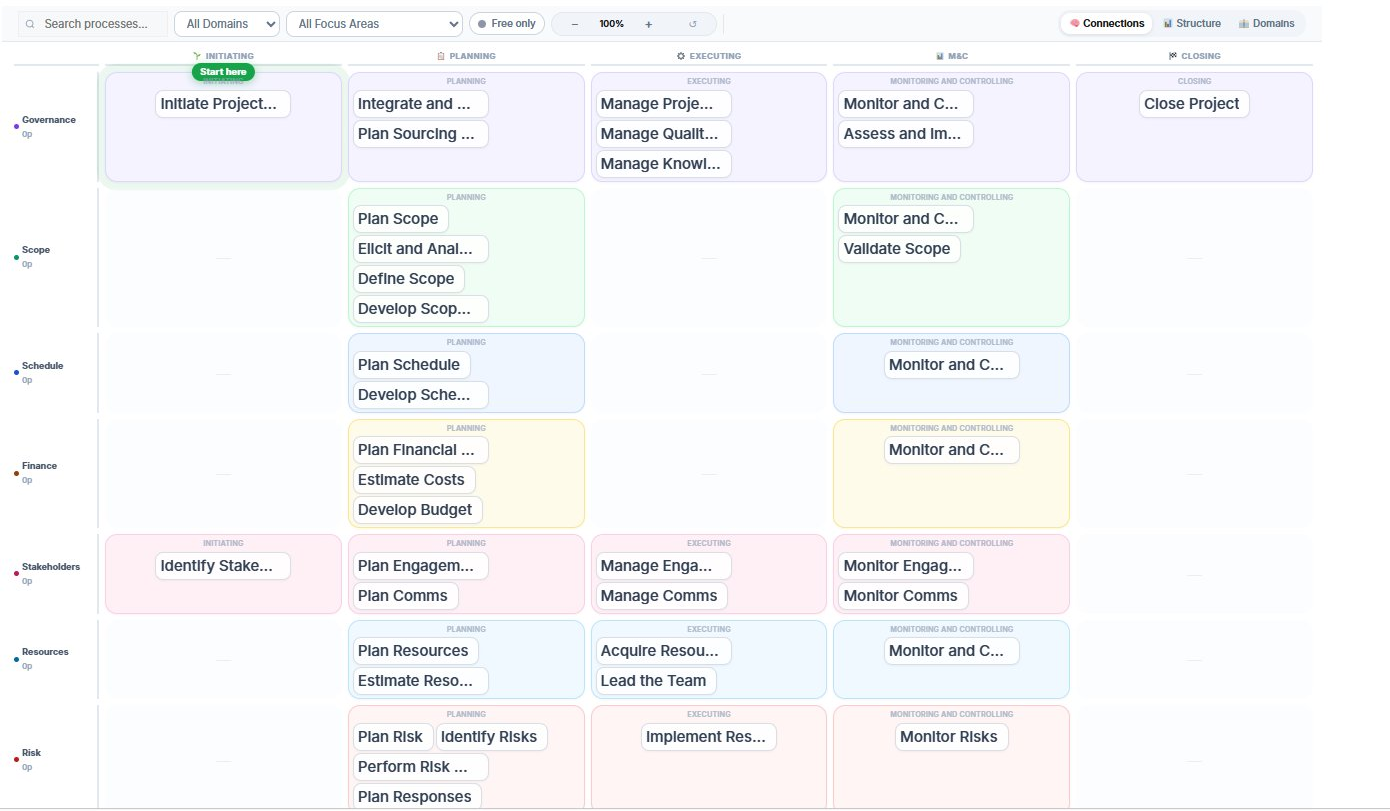
See what to apply, what to skip, and how experienced PMs think when projects get messy.
Discover the system
PM Nexus reveals value gradually: first the structure, then the process logic, then the judgment behind real project decisions.
Decision support
This is where PM Nexus starts guiding what you do next.
These tools don’t just show information.
They help you decide what to do next.
This is where PMBOK® Guide becomes practical.
A guided product story
PM Nexus is not just a feature list. It is a connected way to move from “I know the terms” to “I can see what this means in a real project.”
What changes for you
Stop memorizing disconnected processes. Understand how PMBOK® Guide flows as one connected decision system.
Move beyond theory. Explore scenarios, trade-offs, and tailoring decisions that experienced PMs make in real projects.
Learn what to apply, what to simplify, and where project risks usually appear before they become expensive problems.
See the product proof
Open a process, follow the connections, and see how scenarios turn framework knowledge into project judgment.
How professionals are using PM Nexus
 in
in
 in
in
 in
in
 in
in
 in
in
 in
in
 in
in
 in
in
 in
in
 in
in
 in
in
 in
in
Access
Every journey starts free. During Early Access, every free account unlocks the complete PRO experience until October 1, 2026.
Create a free account during Early Access and unlock the complete PRO decision layer while PM Nexus continues to evolve.
For organizations
When individuals use PM Nexus, they build personal clarity. When teams use it together, they build a shared decision language.
FAQ
Both. You can use PM Nexus while you prepare for the exam, but also after training when you want help applying the framework in real projects.
No. It works best alongside training. Think of it as a practical companion or second screen: your course explains the concepts, and PM Nexus helps you see how they connect and how to use them.
No. You can explore the interactive map and sample process pages instantly - no account required. Create a free account to unlock the full learning experience. During Early Access, that same free account also unlocks the full PRO layer until October 1, 2026 - including Tailoring Engine, Risk Radar, Decision Replay, PM Decision Profile, scenario practice, PDU tracking and personalized progress insights.
Pro is for anyone who wants decision support on real projects. It unlocks the AI layer: Tailoring Engine, Risk Radar, Decision Replay, and PM Decision Profile. During Early Access, PRO is free until October 1, 2026 so early users can test the full system and help shape the product with feedback.
Yes. PM Nexus gives people a shared PM system they can use during training, after training, and inside real project conversations. See the Enterprise plan →
Early Access means you can create a free account and use the complete PRO layer until October 1, 2026 - without adding a credit card. During this period, PM Nexus continues to evolve and early user activity helps prioritize upcoming product improvements.
If you create your account before October 1, 2026, you qualify for Founding Member pricing. When Early Access ends, you can subscribe to PRO with 50% off your first year. If you decide not to upgrade, your account simply continues on the free plan.
Yes. PM Nexus is designed with privacy and security in mind. Your project information, learning activity, PMI ID and certification-related data remain private and are used only to provide platform functionality such as progress tracking and eligible PDU reporting. We do not sell your data.
Over 15 years of building software systems, leading complex programs, training project managers and helping organizations improve delivery, one pattern kept appearing:
Project management knowledge exists everywhere. Project judgment does not.
People understand concepts. But when projects become complex and decisions must be made under pressure, connecting everything together becomes much harder.
PM Nexus was built to close that gap - combining software engineering, program management and PM education into one practical system for learning, tailoring and making better project decisions.
Open the map, follow the connections, and practice the decisions that make PMBOK® Guide useful in real projects.